

Full Data Scan or Sampled? How Sentra Gives Customers Control Over Coverage, Cost, and Risk
Sentra lets security teams choose how deeply each data store is scanned, including the option to scan everything with no sampling, so they get full coverage where the risk is highest without paying for full scanning everywhere.
Key takeaways
- Teams can scan everything where the risk requires it and sample where it doesn't, using independent settings for how many files are opened and how deeply each is read.
- Sentra can run with zero sampling. Every file is opened and read end to end, with no file size or memory limit.
- Scan depth is set per data store, so regulated repositories can run at full depth while repetitive, lower-risk stores run lighter.
- Coverage is reported for every data asset in the portal, so teams can see and verify what was actually scanned.
Enterprise data estates are growing faster than security teams can keep up with. Sensitive data is spread across databases, data lakes, object stores, file shares, and SaaS applications, often at petabyte scale. Security teams need to know what's there and where the risk is, and getting that visibility means scanning enormous amounts of data.
That raises questions most buyers don't ask until late in an evaluation. Does the scanner read a 40 GB file in full, or stop partway through? Does it read an entire document, or only the first few pages? In a repository with millions of files, does it inspect every file or only a sample? The answers decide what sensitive data can be found, what might be missed, and how much time and compute it takes to get there.
These questions should come up first. A buyer who doesn't know how a platform samples is buying a classification result without knowing how it was produced.
Both extremes have a cost. Scanning every byte of every data store consumes significant time and compute. Sampling makes scanning far more efficient, but it creates blind spots when teams don't know what was inspected, what was skipped, or how deeply each file was read. And different data needs different coverage: a regulated repository of customer records may warrant a full scan, while millions of repetitive application logs may not.
Security teams should be able to decide where they need complete coverage, where sampling makes sense, and how much of their data was actually inspected. Sentra puts that decision in the customer's hands.
A spectrum the customer controls
Sampling is usually treated as a yes or no question. In practice there are two independent choices, and each one creates a different kind of coverage gap.
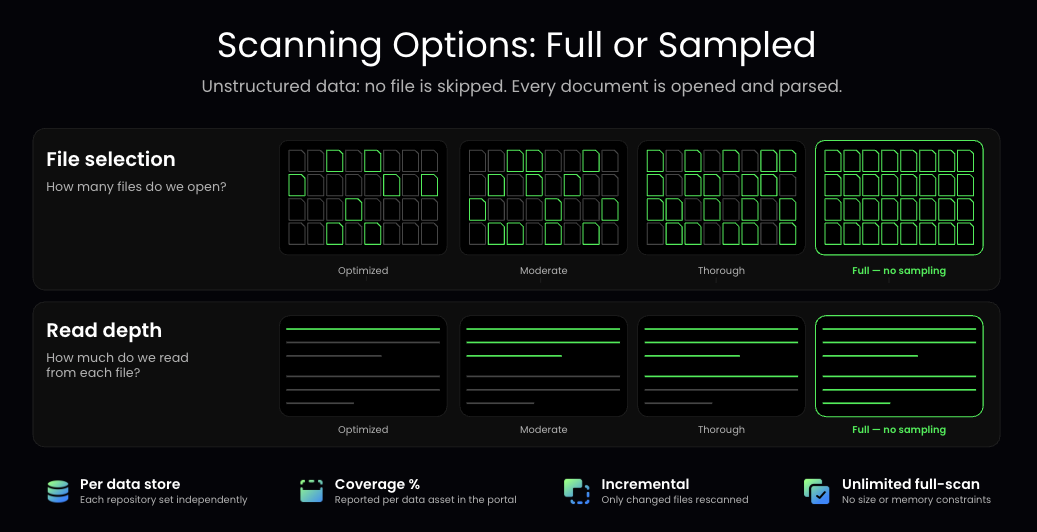
- File selection determines how many files in a data store are opened and inspected. A scanner can open every file, or open a portion of them and apply what it learns to the rest.
- Read depth determines how much of each opened file is read. A scanner can read the entire file, or read part of it and classify based on that.
The two settings don't depend on each other. A scanner can open every file and read only part of each one, or open a subset of files and read each of them completely. Reading only part of every file can miss a Social Security number on page 40 of a contract. Opening only some files can miss the one spreadsheet of customer records sitting in a folder of otherwise harmless exports.
Sentra gives customers separate control over both settings. Each runs on the same scale, from Optimized through Moderate and Thorough to Full. When both are set to Full, nothing is sampled.
When the risk requires it, Sentra reads everything
Some data is too important to sample: a regulated production database, a repository of customer financial information, a legal document store. For these, customers can set Sentra to Full, where every file is opened and read in its entirety.
Full file reads are harder to deliver than they sound. A scanner that loads a whole file into memory before classifying it will either fail or quietly truncate once files get large. Multi-gigabyte archives, large Parquet and CSV exports, mailbox exports, and long scanned PDFs are common in enterprise environments, and they're often where sensitive data accumulates. If the scanner stops reading partway through, anything deeper in the file goes undetected, and the file may still be reported as scanned.
Sentra's full scan has no file size or memory constraints. When a data store is set to Full, the entire file is read regardless of size, and the classification reflects the whole file. The size of the overall environment doesn't have to limit how thoroughly the most important data is inspected.
Scan depth should be a risk decision
Choosing to sample and being forced to sample are different situations. A team might decide that sampling is right for a large repository of repetitive telemetry, because a full scan wouldn't justify the extra time and cost. That's a deliberate risk decision. A product that can't scan past a certain depth, file size, or share of the environment makes that decision for the customer.
Sentra treats scan depth as a spectrum, from smart sampling at the Optimized end to full content reads at the other, and each data store is configured independently. One environment can run several settings at once:
- A production customer database in a regulated region runs at Full on both file selection and read depth.
- A legal document share runs at Full read depth, because sensitive terms can appear anywhere in a long contract.
- Engineering scratch buckets and build artifacts run at Optimized.
- A data room opened for an acquisition runs at Full during due diligence and moves to a lighter setting after the deal closes.
Teams can change these settings as a repository's importance changes. The scanning approach fits the organization's security requirements, and the team that owns the risk controls the tradeoff between coverage, cost, and time.
Being upfront about the cost of full coverage
Reading more data takes more compute and more time, so full scanning costs more than lighter scanning. That's true of every platform. Customers should hear it at the start of an evaluation, not discover it on their first invoice.
With Sentra, scanning cost follows the settings you choose. Before running Full across a large estate, teams can review the expected scan time and cost for the data stores involved and decide where full depth is worth it.
For a sensitive repository, full coverage often justifies the extra resources. The same spend on a large store of repetitive, low-risk data usually adds little. Per-store settings let teams put scanning resources where they add the most security value.
Keeping coverage current without starting over
Enterprise data doesn't stand still. New files are created, existing files change, and repositories keep growing, so a team with complete visibility last month may not have it today. Rescanning everything from the beginning spends resources on data that hasn't changed.
Sentra rescans only files that have been created or changed since the previous scan. A full baseline on a critical data store is a one-time cost, and the ongoing cost depends on how much data changes, not how much data exists. That makes it realistic to keep sensitive repositories at Full permanently, so teams have a current view of sensitive data instead of a periodic snapshot with sampling in between.
Knowing what was actually scanned
A classification result is more useful when the team knows what sits behind it. Sentra reports coverage for each data asset in the portal. If a store uses sampling, teams can see the coverage that setting produced. If it's set to Full, they can verify that too. When an auditor asks how much of the cardholder data environment was scanned, the team can show a number.
Sampling alone isn't the problem. The problem is sampling, truncation, or extrapolation the customer can't see. Any vendor that says it scans everything should be able to show coverage per asset. If it can't, the claim is hard to verify.
What this means for security teams
Large estates get to useful visibility faster. Teams can start at Optimized across the whole environment, get a risk map quickly, and then raise depth on the stores where sensitive data turns up.
Scanning resources follow the risk. Compute and effort concentrate on sensitive, regulated, and high-value data instead of being spread evenly across every repository.
Full coverage stays available for critical repositories, so teams don't have to accept sampling there just because the overall estate is large.
Audit evidence is easier to produce, because coverage is reported per asset instead of asserted in a slide. And there are fewer surprises later: when teams know what was read and how deeply, a new finding reflects new data, not a gap nobody knew about.
Frequently asked questions
Does Sentra sample data?
Only if you choose it. Sentra supports several levels of sampling, and it also supports Full, which reads every file in its entirety. The level is set per data store based on its sensitivity, structure, and requirements.
What's the difference between file selection and read depth?
File selection is how many files in a data store get opened. Read depth is how much of each opened file gets read. Sentra controls them separately because they affect different kinds of risk: file selection decides whether an unusual file gets looked at, and read depth decides whether sensitive content deep inside a file gets found.
Can Sentra fully scan a data store?
Yes. When file selection and read depth are both set to Full, every file is opened and read in full.
Can Sentra read very large files in full?
Yes. Sentra's full scan has no file size or memory constraints, so large archives and exports are read completely rather than truncated.
Why not run every data store at Full?
Full scanning takes more time and compute. Some repositories hold highly repetitive data where reading everything adds little security value, so Sentra lets customers decide based on the data and risk of each repository.
Does Full scanning cost more?
Yes. Per-store settings and incremental scanning, which rescans only new and changed files after the initial baseline, keep that cost focused on the data that needs it.
How do I know how much of my data was scanned?
Sentra reports coverage for every data asset in the portal.
Get the coverage you need, where you need it
No single scanning depth makes sense for every type of enterprise data. Security teams need full coverage in some places, faster and more efficient scanning in others, and visibility into the difference.
Sentra lets teams control file selection and read depth for each data store, so they can scan everything when the risk requires it, sample when it makes sense, and see the resulting coverage either way.
Book a demo to see how Sentra scans your environment and what full coverage would look like for your highest-risk data stores.
Sentra lets security teams choose how deeply each data store is scanned, including the option to scan everything with no sampling, so they get full coverage where the risk is highest without paying for full scanning everywhere.
